
Sharp barcodes
Bars, 2D codes and small print land on the printer's dot grid, so scanners read them first time.
macOS driver for Zebra ZPL label printers
CrispDock replaces the fuzzy built-in macOS driver. Barcodes come out sharp, labels print without pausing, and shipping labels on letter-size sheets are cut out and rotated to 4×6 for you.
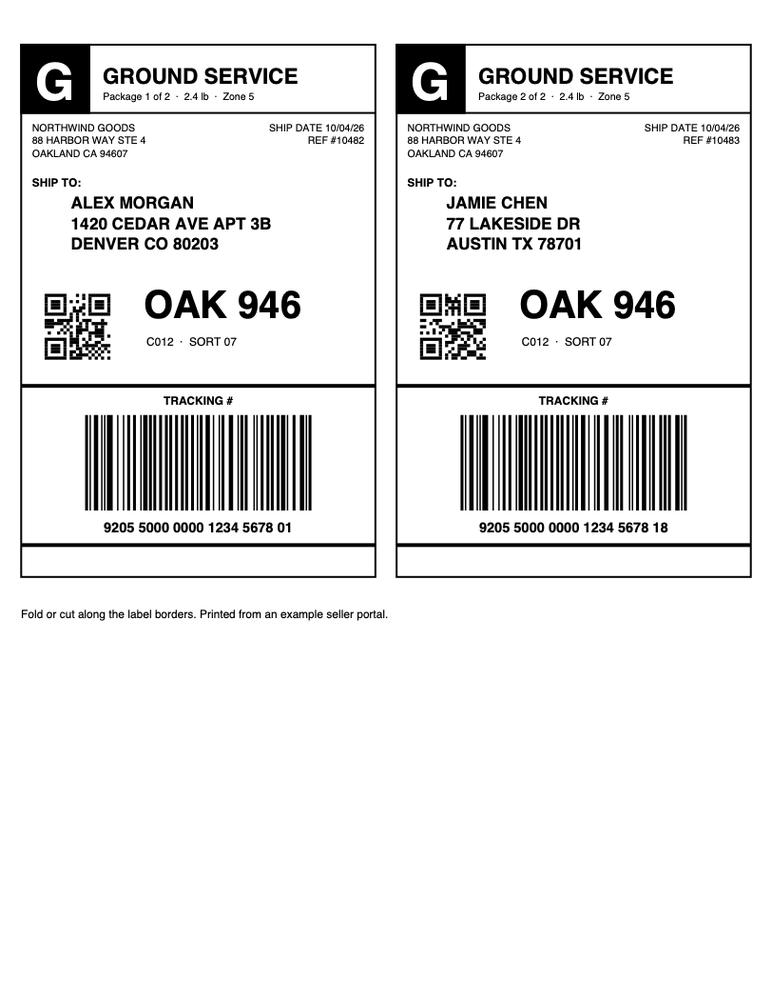
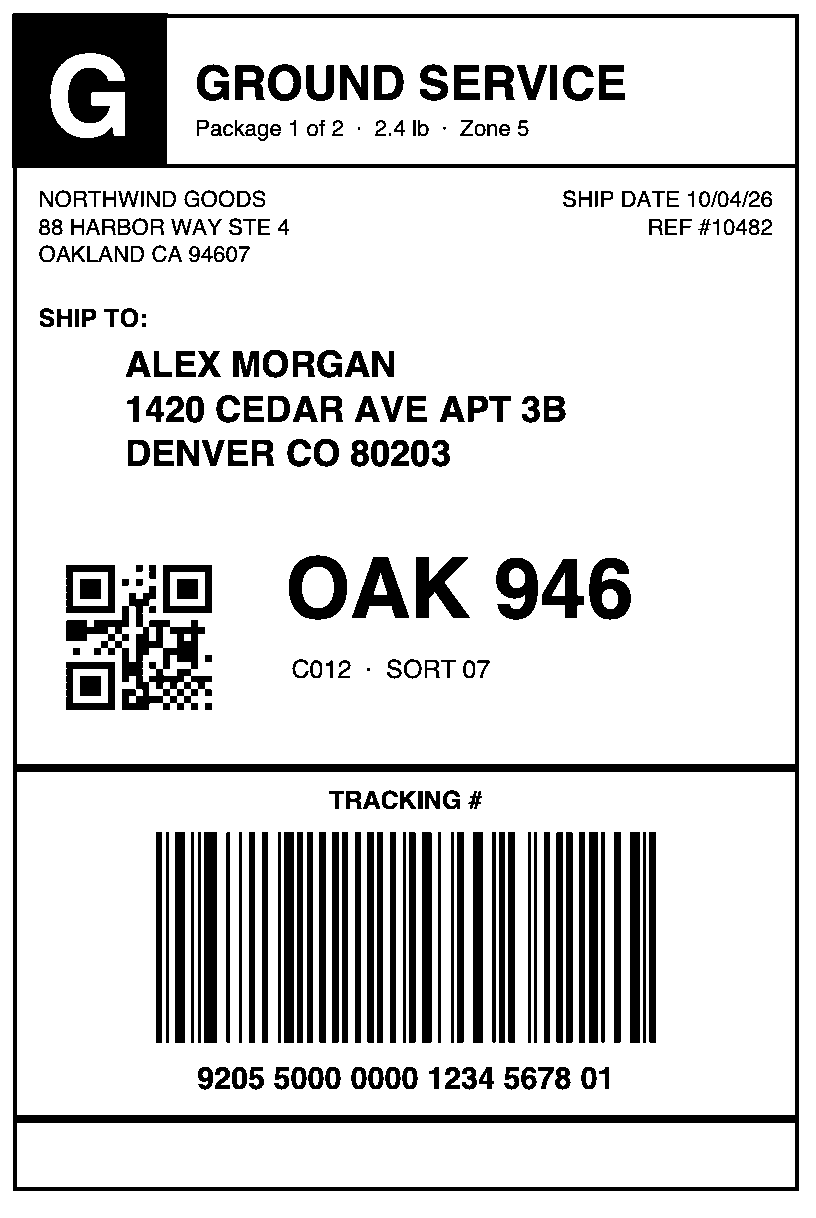
macOS ships a generic Zebra driver that blurs barcodes and streams labels slowly. CrispDock converts every page into clean printer commands made for thermal labels.


Bars, 2D codes and small print land on the printer's dot grid, so scanners read them first time.
Each label is compressed and sent in one piece, so the printer runs smoothly instead of pausing mid-label.
Print from Chrome, Safari, Preview or any PDF app with ⌘P. Margins added by the app are ignored — the label always fills 4×6.
Labels printed for 8.5×11 paper — one or two per page, framed or not, sideways or upright — are found, cut out and rotated automatically.
The installer finds Zebra printers on USB and your network, and detects 203, 300 or 600 dpi heads.
Drop a PDF, PNG, JPEG or iPhone photo into the CrispDock app and see every label exactly as the printer will get it.
The CrispDock app shows the exact output of the driver — one tile per label. A sheet with two shipping labels becomes two upright 4×6 labels.

Open the installer with your Zebra connected. It sets up every printer it finds and keeps their names, so other apps keep working.
Press ⌘P in any app, pick the Zebra printer and 4×6 paper.
Sharp, full-size labels come out in one smooth pass.
Zebra printers that speak ZPL — for example GK420, GX420/430, ZD410/420/421/620, ZP 450/500/505 (ZPL) and ZT series — over USB, Ethernet or Wi-Fi, at 203, 300 or 600 dpi.
EPL-only models such as the LP 2844, CPCL mobile printers, and Bluetooth connections (macOS can't print to them).
Every feature is free to try. Pick a plan to remove the “CrispDock FREE” watermark from your labels — pay monthly, yearly, or once.
No watermark on labels you print from this Mac.
Also print from iPhone, iPad and other Macs on your Wi‑Fi through this Mac — no watermark there either.
For a busy season or a quick job
$2.99 / month
Cancel anytime
Online checkout opens soon.
Renews monthly until you cancel.
For shops that ship every week
$29.99 / year
Save 16% vs monthly · about $2.50 / month
Online checkout opens soon.
Renews yearly until you cancel.
Pay once, own it
$59.99 one-time
No renewals, works offline forever
Online checkout opens soon.
One payment. Nothing renews.
Every feature, no time limit. A “CrispDock FREE” watermark is printed across the whole label.
| Free | Monthly | Yearly | Lifetime | |
|---|---|---|---|---|
| Pro | $0 | $2.99 / mo | $29.99 / yr | $59.99 once |
| Pro + AirShare | — | $4.99 / mo | $49.99 / yr | $99.99 once |
| “CrispDock FREE” watermark | On every label | None | None | None |
| Printing from iPhone, iPad, other Macs | Watermarked | No watermark with AirShare | No watermark with AirShare | No watermark with AirShare |
| Macs per key | Any | 1 | 1 | 1 |
| Updates | All | While subscribed | While subscribed | All 1.x |
| Works offline | Always | Until 24 h after the paid period | Until 24 h after the paid period | Always |
| Switch to Lifetime | — | Pay the difference | Pay the difference | — |
Already a customer? Manage subscription
Prices in US dollars. Sales tax may apply. Subscriptions renew automatically at the price shown until you cancel; cancel anytime from your account and Pro stays on until the end of the period you've paid for. Pro keys need CrispDock 1.3 or later. Payments are processed by Stripe.
No. CrispDock is the driver. Zebra doesn't publish one for macOS, and the generic one built into macOS is what causes fuzzy, slow labels.
Anything that prints on a Mac: browsers, Preview, PDF apps. Labels from marketplaces, shipping tools and carrier sites all work, whether they come as 4×6 pages or on letter-size sheets.
Nothing — every feature works. Each label just prints with a “CrispDock FREE” watermark repeated across the whole label. Any paid plan removes it.
Right after payment you get a licence key by email. Paste it into the CrispDock app to activate. Each key works on one Mac; deactivate it in the app (or your account) to move the key to a new Mac.
Pro keys need CrispDock 1.3 or later — older versions can't activate them. Download the latest version from this page and install it over the old one; your printers and settings stay.
Use “Manage subscription” on this page to sign in with your email, then cancel. Nothing is charged after that, and Pro keeps working until the end of the period you've already paid for. The same page lets you change your card and download invoices.
When the paid period ends — because you cancelled, or a renewal payment failed and the card wasn't updated within 24 hours — Pro keeps working for 24 more hours. After that, labels print with the free watermark again. Nothing else changes: your key, Macs and settings stay, and renewing turns Pro back on with the same key.
Yes, from your account page — you keep the same key and Macs. The unused days left in your current billing period are taken off the Lifetime price ($59.99, or $99.99 with AirShare) and you pay the difference. Periods you've already used aren't credited, and the subscription itself isn't refunded. For example, switching from monthly Pro to Pro Lifetime on the first day costs $57.10.
CrispDock can share this Mac's Zebra printers on your Wi‑Fi, so iPhones, iPads and other Macs can print to them. With Pro, labels printed that way carry the watermark; Pro + AirShare removes it. Labels you print on the Mac itself have no watermark on either plan. Already on Pro? Add AirShare from your account: subscriptions pay only the difference for the rest of the period, and Pro Lifetime upgrades for $40.
If CrispDock isn't right for you, contact us within 30 days of a payment and we'll refund that payment in full. Once a payment is refunded, its licence key stops working right away.
No. Every label is converted on your Mac. CrispDock only goes online to activate your licence and to check it now and then — printing works offline. A subscription is renewed in the background whenever the Mac is online; a Mac that stays offline past the end of a paid period plus 24 hours prints with the watermark until it reconnects.
It switches them to the CrispDock driver but keeps their names, so tools that send raw ZPL to them keep working. Uninstalling restores the built-in driver.